Average Ratings 0 Ratings
Average Ratings 0 Ratings
Similar Products
-
MicroStationMicroStation is the trusted CAD software that empowers infrastructure professionals to design, manage, and deliver projects with precision and efficiency. Its power, flexibility, AI automation, and 3D geospatial context enable innovative designs and creative visualizations. Communicate design changes and unite critical project elements in a single environment, ensuring effective and secure project deliverables. MicroStation scales for any infrastructure project, whether it lasts days, months, or years. MicroStation is the foundation for the entire Bentley modeling environment including digital twins.
-
ActCAD SoftwareACTCAD is suitable for professional drawings creation for Architects, Structural Engineers, Civil Engineres, Mechanical Drawings, Electrical drawings, interior design, tool design, machine designs etc.ActCAD is professional grade 2D Drafting and 3D Modeling CAD software which works in dwg and dxf file formats. Most affordable cad software.ActCAD is a native dwg/dxf cad software suitable for professional 2D drafting and 3D modeling projects. ActCAD is trusted by over 30000 users in over 103 countries for more than 10 years. The interface, commands, icons, dialogs, shortcuts etc. are very much similar to other popular cad software tools available in market. Flexible license types available even for single license. There is no learning for existing cad users while saving 80% of the costs.ActCAD offers free email technical support without any limitations. ActCAD can be fully customized and programs can be developed using our free API toolkit. It supports popular programming languages like , lisp dcl, .net, C++ etc. Apart from all regular commands, ActCAD offers many productive tools like pdf to cad converter, Block libraries, Image to Cad converter, handling point sets between Cad and Excel and many more.
-
wp2printwp2print, an e-commerce web to print system, was created specifically for print providers to sell products online. Wp2print is able to sell digital, wide-format, and book products, as well as blueprints. wp2print comes with production management and proofing. WordPress-based wp2print has many strong advantages. 1. For accurate price calculations, use powerful pricing calculators 2. File uploader that can handle all file formats and unlimited file sizes 3. Online tool for award-winning design 4. Both public and private stores 5. 5. 6. Available for monthly rental or one-time purchase
-
AnalyticsCreatorAnalyticsCreator is a metadata-driven design application for data warehouse automation and data product engineering across the Microsoft data stack. Its Governed Control Model connects business meaning, data structures, transformation rules, dependencies, lineage and technical implementation in one controlled project model. Data teams design the required architecture in AnalyticsCreator, then generate native Microsoft assets from that design. Generated outputs can include SQL Server objects, SSIS packages, Azure Data Factory pipelines, supported Microsoft Fabric components, deployment artefacts and Power BI semantic models. AnalyticsCreator supports dimensional, 3NF and hybrid modelling approaches together with ingestion, transformations, delta loading, historisation, Slowly Changing Dimensions, snapshots and repeatable data-processing patterns. Because generated outputs are native Microsoft technology, no AnalyticsCreator runtime is required in production. Organisations retain ownership of the resulting implementation and can integrate generated assets into Git, Azure DevOps and CI/CD workflows. Lineage, documentation and dependency information remain connected to the design, helping teams understand change impact before regenerating affected assets. Design Intelligence extends this governed project context into AI-assisted data engineering by providing authorised AI tools and agents with structured access to metadata, lineage, dependencies and design rules. Typical use cases include enterprise data warehouse development, Microsoft Fabric adoption, SQL Server and SSIS modernisation, governed Power BI delivery and repeatable data product engineering.
-
Planview AdaptiveWorkPlanview AdaptiveWork, previously known as Clarizen, empowers PMOs and professional services teams of various sizes to achieve instant visibility across their operations, streamline workflows, proactively address potential risks, and enhance overall business outcomes. By aligning with the company’s strategic objectives, organizations can maximize workforce effectiveness, ensuring that teams concentrate on delivering the most critical tasks timely. It facilitates the tracking, management, and prioritization of work requests, guaranteeing that each request automatically encompasses all necessary information for execution. With bi-directional integration with your CRM and custom triggers in place, opportunity details can be effortlessly captured to aid in planning client projects. The platform automates and governs the various phases of the request lifecycle, including submission, scoring, prioritization, routing, and approval, thereby streamlining the pathway for converting requests into actionable projects, tasks, or work items. This comprehensive approach not only boosts efficiency but also fosters a culture of accountability and transparency within the organization.
-
PackageX OCR ScanningPackageX OCR API turns any smartphone into an incredibly powerful universal label scanner. It can read every bit of text, including barcodes, QR codes and other information on the label. Our OCR technology is the best in the industry. It uses proprietary algorithms and deep learning models to extract information from labels. Our OCR API has been trained using information from more than 10 million labels. This allows for the highest scanning accuracy in the market, at over 95%. Our technology can scan in low-light conditions and read labels from any angle. Create your own OCR scanner app to eliminate pen-and-paper inefficiencies. Our OCR scanner allows you to extract information from printed text or handwritten labels. Our OCR software is trained using multilingual label data extracted in over 40 countries. Detect and extract information from barcodes or QR codes.
-
KonstructIQKonstructIQ is an innovative platform that integrates artificial intelligence to serve the needs of residential general contractors, remodeling companies, and home builders by streamlining both construction and financial management. This comprehensive tool covers the entire project lifecycle, encompassing fast and professional estimates, budgeting, invoicing, payment processing, change-order management, cost tracking, subcontractor coordination, and real-time reporting, all within a unified interface. Its estimating feature allows contractors to create precise bids swiftly, utilizing customizable cost codes and the ability to calculate markups or margins, as well as accommodating both cost-plus and fixed-price pricing models. Upon approval of an estimate, it transforms into the project budget, ensuring that every bill, invoice, or change order automatically reflects on the budget, enabling contractors to maintain precise job costing and oversight of profitability. Additionally, the platform facilitates payments to subcontractors or suppliers, supporting various methods such as ACH transactions, checks, debit and credit cards, virtual cards, or Zelle, while also enabling clients to pay invoices directly through a user-friendly portal, which accelerates cash flow significantly. This holistic approach not only simplifies administrative tasks but also enhances financial transparency for contractors, ultimately contributing to more efficient project completion.
-
Gemini Enterprise Agent PlatformGemini Enterprise Agent Platform is Google Cloud’s next-generation system for designing and managing advanced AI agents across the enterprise. Built as the successor to Vertex AI, it unifies model selection, development, and deployment into a single scalable environment. The platform supports a vast ecosystem of over 200 AI models, including Google’s latest Gemini innovations and popular third-party models. It offers flexible development tools like Agent Studio for visual workflows and the Agent Development Kit for deeper customization. Businesses can deploy agents that operate continuously, maintain long-term memory, and handle multi-step processes with high efficiency. Security and governance are central, with features such as agent identity verification, centralized registries, and controlled access through gateways. The platform also enables seamless integration with enterprise systems, allowing agents to interact with data, applications, and workflows securely. Advanced monitoring tools provide real-time insights into agent behavior and performance. Optimization features help refine agent logic and improve accuracy over time. By combining automation, intelligence, and governance, the platform helps organizations transition to autonomous, AI-driven operations. It ultimately supports faster innovation while maintaining enterprise-grade reliability and control.
-
JetBrains JunieJetBrains Junie is an innovative AI coding assistant that works inside many JetBrains IDEs to streamline programming efforts and boost efficiency. This agent leverages advanced AI to help developers write, test, and inspect code without leaving their familiar development environment. Junie offers both code execution and interactive collaboration, allowing programmers to switch between automated code writing and brainstorming sessions for features and improvements. By deeply understanding the codebase, Junie identifies the best ways to tackle tasks and ensures all changes meet quality standards through syntax and semantic checks. It also runs tests to minimize errors and keep the project healthy, freeing developers from routine tasks. Many developers have successfully built complex applications and games using Junie, highlighting its flexibility across different languages and frameworks. The AI adapts to each task’s complexity and workflow, making coding less tedious and more focused on creativity. Whether you are building a simple web app or a complex game, Junie offers smart support throughout the development cycle.
-
FinOpslyMost enterprises can report what AI cost them. Far fewer can say which team owns it, whether it was approved, or what it returned. FinOpsly closes that gap. The platform governs AI spend on the same cost model that carries the cloud, data platform and SaaS an AI workload consumes, so a business unit sees the full cost of an AI initiative instead of four disconnected bills. Capabilities include: Cost estimation before deployment. Model an architecture and get a priced workload across model APIs, GPU capacity, warehouse consumption and storage, with the assumptions on screen. Weigh model choices against consumption you have actually measured. Attribution that holds up in a chargeback cycle. Spend resolves to owners, teams, applications, business units and customers through hierarchies nine or more levels deep. Tagging is standardized across providers, keys and resources are labeled in bulk from plain-language rules, and whatever remains unattributed is published as a number, not absorbed. Guardrails that act. Set budgets by project, team or API key. Catch anomalies with root cause and route them to whoever owns the resource. Surface waste that provider tooling misses, using FinOpsly's own detection models. Plan commitments across AWS, Azure and Google Cloud. Park idle compute on approved schedules, reversibly. Financial results you can defend. Automated chargeback in a single cycle. Savings measured as what reached run-rate against a no-action baseline. Unit economics down to cost per call, per active user and per customer served. For technology and finance leaders accountable for what AI spend returns.
Description
AStrutTie is a specialized design software tailored for the strut-and-tie model (STM) of concrete structures where conventional beam theory is inadequate, including applications in deep beams, corbels, pile caps, pier caps, footings, abutments, and anchorage zones. Users can select a template and input necessary dimensions, materials, and loads, allowing AStrutTie to generate the strut-and-tie model, perform truss analysis, and verify each strut, tie, nodal zone, and anchorage in accordance with the relevant design codes. The calculation report meticulously details each verification alongside its corresponding clause reference, enabling thorough review of the design process. Supported design codes include ACI 318, AASHTO LRFD, Eurocode 2, KDS, and KDS-LSD, allowing users to switch between codes for comparative analysis on the same model. The software operates seamlessly in a web browser across Windows, macOS, or Linux platforms without requiring installation; users simply sign in with their email. The free tier provides access to models with up to 15 nodes and generates reports that include a watermark, while Standard and Pro subscriptions begin at $100 per month. Additionally, professors and students can access the Pro version free for a year to facilitate their teaching and research efforts. AStrutTie is developed by Hangil IT, a company based in Korea, committed to enhancing the efficiency and accuracy of structural design.
Description
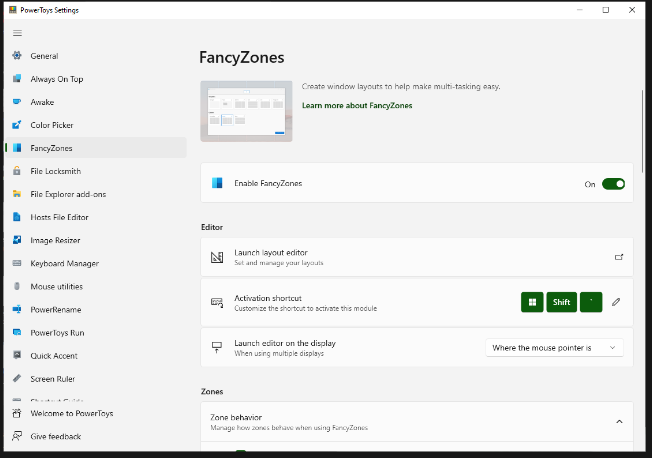
FancyZones serves as a window management tool designed to help users arrange and snap their application windows into optimized layouts, enhancing workflow efficiency and allowing for quick restoration of these layouts. This utility empowers you to specify a series of designated zones on your desktop where windows can be directed. By dragging a window into a predetermined zone or using a designated keyboard shortcut, the respective window automatically resizes and relocates to occupy that zone completely. Additionally, if you have the "Use non-primary mouse button to toggle zone activation" option activated, you can enter zone selection mode by simply clicking the secondary mouse button. When two zones are positioned next to each other, a window can be adjusted to span the combined area of both zones, effectively rounding up to the smallest rectangle that encompasses the two. As you maneuver the mouse cursor close to the shared boundary of two zones, both zones become active at the same time, giving you the flexibility to drop the window into either or both. Moreover, you can drag the window until it activates one zone and then, by pressing and holding the control key while continuing to drag, select multiple zones to expand your layout options. This feature significantly streamlines the process of organizing your desktop workspace efficiently.
API Access
Has API
No
API Access
Has API
No
Screenshots View All
No images available

Integrations
No details available.
Integrations
No details available.
Pricing Details
$100/month
Free Trial
No
Free Version
Yes
Pricing Details
Free
Free Trial
No
Free Version
Yes
Deployment
Web-Based
Yes
On-Premises
No
iPhone App
No
iPad App
No
Android App
No
Windows
No
Mac
No
Linux
No
Chromebook
No
Deployment
Web-Based
No
On-Premises
No
iPhone App
No
iPad App
No
Android App
No
Windows
Yes
Mac
No
Linux
No
Chromebook
No
Customer Support
Business Hours
No
Live Rep (24/7)
No
Online Support
Yes
Customer Support
Business Hours
Yes
Live Rep (24/7)
No
Online Support
Yes
Types of Training
Training Docs
Yes
Webinars
No
Live Training (Online)
No
In Person
No
Types of Training
Training Docs
Yes
Webinars
Yes
Live Training (Online)
No
In Person
Yes
Vendor Details
Company Name
Hangil IT
Founded
1997
Country
South Korea
Website
www.astruttie.com
Vendor Details
Company Name
Microsoft
Country
United States
Website
learn.microsoft.com/en-us/windows/powertoys/fancyzones
