Average Ratings 0 Ratings
Average Ratings 0 Ratings
Similar Products
-
All in One AccessibilityAn AI based accessibility tool enables websites to be accessible among people with hearing or vision impairments, motor impaired, color blind, dyslexia, cognitive & learning impairments, seizure & epileptic, ADHD, elderly, and Parkinson. It installs in just 2 minutes. It reduces the risk of time-consuming accessibility lawsuits by improving accessibility compliance for the standards WCAG 2.0, 2.1, 2.2, ADA, Section 508, European EAA EN 301 549, Canada ACA, California Unruh, Israeli Standard 5568, Australian DDA, UK Equality Act, Ontario AODA, Indian RPD Act, GIGW 3.0, France RGAA, German BITV, Brazilian Inclusion law LBI 13.146/2015, Spain UNE 139803:2012, JIS X 8341, Italian Stanca Act, Switzerland DDA & more. It supports GDPR, HIPAA, CCPA, SOC Type 2, ISO 9001:2015, & ISO 27001:2022. It supports 190+ languages. It is a cornerstone of improving web accessibility through its ease of use for companies of all sizes and with the help of paid add-ons like manual accessibility audit, remediation, PDF accessibility remediation, VPAT/ ACR, white label subscription, and live site translation, SkynetAccessibility Scanner, and video subtitle. Top features of the All in One Accessibility: - AI Screen Reader - Accessibility statement - Accessibility interface for UI design fixes - Free Accessibility Statement Generator - Voice Navigation - Talk & Type - Libras (Brazilian Portuguese) Sign Language - Dashboard Automatic accessibility score - AI based Image Alternative Text remediation - AI based Text to Speech Screen Reader - Select Screen Reader Voice - Auto-detect language - Keyboard navigation adjustments - Content, Color, Contrast, Orientation Adjustments - Custom widget color, position, icon size, type - Dedicated support
-
Resco Mobile App Development ToolkitResco Mobile App Development Toolkit is a no-code platform for building custom mobile business applications designed to enhance Microsoft Dynamics 365, Power Platform, Business Central, and Salesforce. Ideal for partners and ISVs, it enables you to create white-labeled, scalable apps for industries like utilities, energy, construction, and field service. With offline functionality and secure data synchronization, you can build mobile solutions tailored for inspections, asset management, work orders, and more. The drag-and-drop interface streamlines customization, allowing you to design workflows, forms, and dashboards without coding expertise. This toolkit empowers you to create verticalized mobile solutions that extend CRM and ERP capabilities while addressing the specific needs of frontline workers. Deliver branded apps, modernize field operations, and generate new revenue streams by equipping clients with reliable, industry-specific mobile technology. Unlock the potential to scale your business with Resco's flexible and robust toolkit.
-
QA WolfQA Wolf helps engineering teams achieve 80% automated test coverage end-to-end in just four months. Here's an overview of what you get in the box, whether it's 100 or 100,000 tests. • Automated end-to-end testing for 80% of the user flows in 4 months. The tests are written in Playwright, an open-source tool (no vendor lock-in; you own the code). • Test matrix and outline in the AAA framework. • Unlimited parallel testing on any environment of your choice. • We host and maintain 100% parallel-run infrastructure. • Maintenance of flaky and broken test for 24 hours. • Guaranteed 100% reliable results -- zero flakes. • Human-verified bugs sent via your messaging app as a bug report. • CI/CD Integration with your deployment pipelines and issue trackers. • Access to full-time QA Engineers at QA Wolf 24 hours a day.
-
FerootFeroot Security is a global leader in AI-powered website and web application compliance and security. Feroot AI protects digital experiences from hidden threats while continuously enforcing compliance with PCI DSS 4.0.1, HIPAA rules on online tracking technologies, CCPA/CPRA, GDPR, CIPA, and over 50 global laws and standards. The Feroot AI Platform replaces manual compliance work and operational overhead with continuous automation. What once required months of effort across security, engineering, and legal teams can now be deployed in minutes, delivering real-time protection and audit-ready evidence. Feroot unifies critical capabilities into a single platform, including JavaScript behavior analysis, web compliance scanning, third-party script monitoring, consent enforcement, and data privacy posture management. It is purpose-built to detect and stop web-based threats such as Magecart, formjacking, e-skimming, and unauthorized tracking on high-risk assets like payment pages, login flows, iframes, and healthcare portals. Trusted by Fortune 500 enterprises, healthcare providers, retailers, SaaS platforms, utilities, payment service providers, universities, and public sector organizations, Feroot safeguards hundreds of millions of users worldwide. Feroot AI solutions include PaymentGuard AI, HealthData Shield AI, AlphaPrivacy AI, CodeGuard AI, and MobileGuard AI. Visit feroot for more information.
-
ShareMyToolboxDiscover ShareMyToolbox - Your Tool Tracking Solution for Construction Teams. Effortlessly oversee small tools and equipment. Seamlessly compatible with Apple and Android devices, users can delve into their company's tool inventory. Smoothly request tools and embrace assignments with the ease of barcode scanning. Harness the potential of GPS coordinates captured during scans, precisely displayed on an interactive map. Tailored meticulously for contractors, our system redefines user-friendliness. Embark on your tool tracking odyssey with three simple steps: Effortless Organization: Cultivate an inventory of tools and equipment, shaping your personalized cloud catalog of invaluable assets. Enhanced Visibility: Empower field personnel, granting rapid access to survey the company's diverse assets via our intuitive mobile app. Cultivate Accountability: Equip field workers with the power to manage tool transactions seamlessly – check-ins, check-outs, and transfers – all facilitated through the convenience of barcodes and QR codes.
-
Building LogisticsBuilding Logistics is a comprehensive solution that manages the incoming flow of packages in buildings, offices, universities, and hotels, ensuring seamless tracking, scanning, sorting, and recipient notifications for each package. With PackageX’s advanced AI scanning technology, the system captures text, QR codes, and barcodes to ensure flawless package intake, enabling efficient package management. The platform also features data validation, automatic contact matching, customizable notifications, and chain of custody tracking, all designed to improve delivery workflows and reduce errors. By providing a more efficient system, PackageX increases delivery speed, accuracy, and overall operational efficiency, making it the ideal choice for managing package logistics in high-traffic environments. With 99% accuracy in package intake, zero lost packages, and twice the efficiency of traditional methods, PackageX delivers a seamless and hassle-free recipient experience.
-
Aikido SecurityAikido is the all-in-one security platform for development teams to secure their complete stack, from code to cloud. Aikido centralizes all code and cloud security scanners in one place. Aikido offers a range of powerful scanners including static code analysis (SAST), dynamic application security testing (DAST), container image scanning, and infrastructure-as-code (IaC) scanning. Aikido integrates AI-powered auto-fixing features, reducing manual work by automatically generating pull requests to resolve vulnerabilities and security issues. It also provides customizable alerts, real-time vulnerability monitoring, and runtime protection, enabling teams to secure their applications and infrastructure seamlessly.
-
Orca SecurityOrca Security is the pioneer of agentless cloud security that is trusted by hundreds of enterprises globally. Orca makes cloud security possible for enterprises moving to and scaling in the cloud with its patented SideScanning™ technology and Unified Data Model. The Orca Cloud Security Platform delivers the world's most comprehensive coverage and visibility of risks across AWS, Azure, Google Cloud and Kubernetes.
-
PylonPylon's intuitive design software allows you to create accurate proposals from anywhere, in less than 2 minutes. Pylon is the only software that allows you to view high-resolution imagery within your app. Pylon's award winning 3D Solar Shading toolkit helps you identify and track shading impacts throughout the year. Pylon's load profile analysis and interval data analysis will help you and your team to better understand customer consumption patterns. Analyze load profiles & interval data. You can close more solar proposals by using interactive Web & PDF proposals and native eSignatures. Fully integrated solar CRM that integrates with your solar design software to convert proposals. Pylon Solar CRM offers 2-way SMS and email communications, team management, lead management and pre-made deal pipelines.
-
CredentialingSpectrumCredentialingSpectrum is a secured, cloud-based medical credentialing software for facility, payer and contract management. It is a healthcare credentialing system that simplifies the process and increases efficiency. CredentialingSpectrum is a one-click comprehensive automation system that makes it convenient and the best provider credentialing software available in the USA.
Description
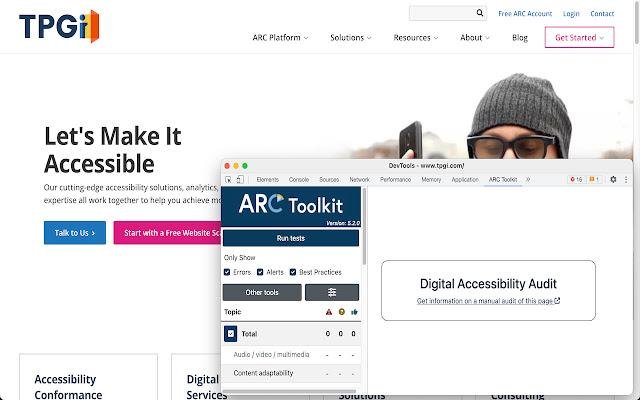
Automated scanning is an important part of your digital accessibility journey and ARC Toolkit is a free, automated scanning tool that comes as a browser plug-in.
1. Scan a single page of your website.
2. Select which accessibility topics you want to examine or check out all of them.
3. Examine the accessibility issues by topic and by WCAG errors, alerts, and best practices within each topic. Or sort accessibility issues by page elements to examine elements with many accessibility problems.
4. Copy errors into bug tracking software.
ARC Toolkit uses the same rules engine as ARC Monitoring, a part of the Accessibility Resource Center.
Description
You can utilize it on any website, whether it's accessible to the public or protected by authentication. It provides evaluations on various aspects such as performance, accessibility, progressive web applications, SEO, and more. Lighthouse can be executed through Chrome DevTools, via the command line, or as a Node application. To use it, simply provide a URL for Lighthouse to evaluate, and it will conduct a series of assessments on the page, ultimately producing a report that reflects the page's quality. From this report, you can identify the audits that did not pass as guidance for enhancing the page. Each assessment comes with a reference document that details why the audit matters and offers suggestions for improvement. Additionally, the Lighthouse Viewer needs the JSON output from a Lighthouse report. The following section outlines how to obtain this JSON format based on the specific Lighthouse stream you are utilizing, ensuring you can effectively interpret and utilize the data.
API Access
Has API
No
API Access
Has API
No


Integrations
Google Chrome
Yes
DebugBear
No
Elite Site Optimizer
No
Microsoft Edge
Yes
Mozilla Firefox
Yes
Sourcetable
No
Tugboat QA
No
Integrations
Google Chrome
Yes
DebugBear
Yes
Elite Site Optimizer
Yes
Microsoft Edge
No
Mozilla Firefox
No
Sourcetable
Yes
Tugboat QA
Yes
Pricing Details
$0
Free Trial
No
Free Version
Yes
Pricing Details
No price information available.
Free Trial
No
Free Version
No
Deployment
Web-Based
Yes
On-Premises
No
iPhone App
No
iPad App
No
Android App
No
Windows
No
Mac
No
Linux
No
Chromebook
No
Deployment
Web-Based
Yes
On-Premises
No
iPhone App
No
iPad App
No
Android App
No
Windows
No
Mac
No
Linux
No
Chromebook
No
Customer Support
Business Hours
No
Live Rep (24/7)
No
Online Support
Yes
Customer Support
Business Hours
No
Live Rep (24/7)
No
Online Support
Yes
Types of Training
Training Docs
Yes
Webinars
Yes
Live Training (Online)
No
In Person
No
Types of Training
Training Docs
Yes
Webinars
No
Live Training (Online)
No
In Person
No
Vendor Details
Company Name
TPGi
Founded
2002
Country
United States
Website
www.tpgi.com
Vendor Details
Company Name
Founded
1998
Country
United States
Website
developer.chrome.com/docs/lighthouse/overview/
Product Features
Web Accessibility Testing
ADA Compliance
Yes
Alerts / Notifications
No
Automated Testing
Yes
Mobile Accessibility Testing
No
Ongoing Accessibility Monitoring
No
Reporting / Analytics
Yes
Visualize Accessibility
Yes
WCAG Compliance
Yes
Product Features
Website Optimization Tools
Competitor Analysis
No
Content Management
No
Keyword Research Tools
No
Link Management
No
Performance Metrics
No
Problem Area Alerts
No
