Average Ratings 0 Ratings
Average Ratings 0 Ratings
Similar Products
-
Secure EraserSecure Eraser: Secure Data Deletion, Shredders Your Files & Folders. Just because it has been removed from your hard drive doesn't mean that it is gone forever. Anyone can restore the information as long as it was not overwritten. It becomes more difficult if the computer has been resold, or given away. Secure Eraser employs the most well-known method of data disposal. It overwrites sensitive information so that it cannot be recovered even with specialized software. Our award-winning solutions for permanently destroying data eliminate cross-references that may leave traces of deleted files within the allocation table of your hard disk. This Windows software is easy to use and can overwrite sensitive data up to 35 times, regardless of whether they're files, folders or drives, recycle bins, or traces of surfing. You can also delete files that you have already deleted but not for good.
-
FilerevFilerev is a powerful tool that helps you easily find and manage hidden files, duplicate files, large files, and oversized folders, ensuring a streamlined and clutter-free digital workspace. Key features include advanced scanning technology that identifies the unorganized files taking up the most space and cluttering your Google Drive. Filerev enhances productivity by saving time and reducing the frustration of manual file organization. The custom filters and bulk delete tool give you complete control over finding and removing unwanted files in your account. The storage analyzer lets you browse your folders by size to see where the space is being used in your Google Drive. Whether you're an individual, a small business, or a large enterprise, Filerev offers robust solutions tailored to your needs. Visit filerev.com to discover how Filerev can transform your Google Drive experience and boost efficiency.
-
OvermonitorOvermonitor is cloud-based infrastructure, website, and endpoint monitoring built for teams that want fast setup, clear alerts, and practical visibility without the complexity or cost of enterprise monitoring suites. Monitor websites, servers, endpoints, processes, Windows services, event logs, uptime, response time, SSL certificates, and internal network health from one easy dashboard. At the core of Overmonitor is a small, lightweight server agent that installs quickly, pairs with your account, and reports a heartbeat every minute from inside your network. This gives you visibility beyond public uptime checks, helping detect server outages, stalled services, failing processes, internal connectivity problems, and endpoint health issues before they become customer-facing downtime. Overmonitor supports city-level geotargeted monitoring, practical maintenance windows that reduce alert noise, push notifications for alerts, audible dashboard alerts for operations screens, process monitor rollups, embeddable performance graphs, and flexible à la carte pricing so you only pay for the monitoring you need. Designed for SaaS operators, IT teams, MSPs, developers, and small businesses, Overmonitor helps you track availability, analyze website performance, monitor infrastructure health, and improve end-user experience without being locked into a bloated monitoring platform.
-
SiteKioskSiteKiosk Online is a turnkey, secure kiosk and digital signage software solution for Windows and Android devices. The company's easy-to-use and scalable application such as SiteKiosk helps protect the browser and operating system against manipulations and provides 24/7 maintenance-free operation.
-
ManageEngine ADAudit PlusADAudit Plus enhances the security and compliance of your Windows Server environment by delivering comprehensive insights into all operational activities. It offers a detailed overview of modifications made to Active Directory (AD) resources, encompassing AD objects and their respective attributes, group policies, and more. By conducting thorough AD audits, organizations can identify and mitigate insider threats, misuse of privileges, and other signs of potential security breaches, thereby bolstering their overall security framework. The tool enables users to monitor intricate details within AD, including entities such as users, computers, groups, organizational units (OUs), group policy objects (GPOs), schemas, and sites, along with their associated attributes. Furthermore, it tracks user management activities like the creation, deletion, password resets, and alterations in permissions, providing insights into the actions taken, the responsible individuals, the timing, and the originating locations. Additionally, it allows organizations to monitor the addition or removal of users from security and distribution groups, ensuring that access privileges are kept to the necessary minimum, which is critical for maintaining a secure environment. This level of oversight is vital for proactive security management and compliance adherence.
-
ESET PROTECT AdvancedESET Protect Advanced offers a comprehensive cybersecurity solution for businesses of any size. It offers advanced endpoint security against ransomware and zero-day threats. It also includes full disk encryption to ensure legal compliance and data security. The solution uses adaptive scanning, cloud sandboxing and behavioral analysis for proactive cloud-based threats defense. Mobile threat protection secures Android and iOS with anti-malware and anti-theft. It also offers cloud app security, mail server protection, vulnerability and patch management, and cloud app protection. Multi-factor authentication and extended detection and reaction (XDR) improve threat detection and response. The solution provides a single pane of glass remote management to provide visibility into threats and users. It also offers advanced reporting and customized notifications.
-
QuantCloud solution to manage retail spaces, product categories and planograms. Smart automatic generation of planograms based on sales is possible. This allows for the maintenance of planograms in a current state even in large sales networks with many stores. Quant is a complete solution for Space Planning and Category Management, planograms and ranging, shelf labels and POS printing, communication and in-store marketing. Quant Cloud offers all the benefits of cloud computing. You can work remotely on the same projects with your colleagues around the globe and access the same database from different computers. There is no need to create complex infrastructures or overload your IT department. Our consultants are always available to assist you. We train your users, and assist with data integration so Quant can go live in less than 12 week.
-
Google Compute EngineCompute Engine (IaaS), a platform from Google that allows organizations to create and manage cloud-based virtual machines, is an infrastructure as a services (IaaS). Computing infrastructure in predefined sizes or custom machine shapes to accelerate cloud transformation. General purpose machines (E2, N1,N2,N2D) offer a good compromise between price and performance. Compute optimized machines (C2) offer high-end performance vCPUs for compute-intensive workloads. Memory optimized (M2) systems offer the highest amount of memory and are ideal for in-memory database applications. Accelerator optimized machines (A2) are based on A100 GPUs, and are designed for high-demanding applications. Integrate Compute services with other Google Cloud Services, such as AI/ML or data analytics. Reservations can help you ensure that your applications will have the capacity needed as they scale. You can save money by running Compute using the sustained-use discount, and you can even save more when you use the committed-use discount.
-
pCloud BusinesspCloud Business is a cloud storage and file synchronization platform designed for teams that need controlled access, cross-platform compatibility, and predictable storage allocation. It provides centralized file management with granular permissions and optional client-side encryption. Founded in 2013 in Switzerland, pCloud operates under EU-aligned privacy standards and offers data residency in Luxembourg (EU) and Dallas, Texas (US). The platform supports over 23 million users globally. Core Functionality : - Per-User Storage Allocation : 1 TB or 2 TB per user, suitable for small to mid-sized teams and distributed environments. - Virtual File System (pCloud Drive) : Mounts as a local drive on Windows, macOS, and Linux. Files are streamed on demand, reducing local disk usage. - File Sync & Sharing : Folder-level sync, link-based sharing, and permission control (view/edit/manage). Supports password-protected and time-limited links. - Admin & Access Control : Centralized user management, role assignment, and storage distribution via admin console. - Versioning & File History : File versioning with up to 180 days retention, enabling rollback and recovery. - Cross-Platform Support : Native clients for Windows, macOS, Linux, iOS, Android, plus web interface. - Client-Side Encryption (Optional) : Zero-knowledge encryption via pCloud Encryption for sensitive data; encryption keys are not stored server-side. Technical Positioning: - Swiss jurisdiction; GDPR-aligned processing - No file size limits - Works without mandatory ecosystem lock-in (no bundled office suite required) - Compatible with heterogeneous environments (Linux included) Trial : 30-day free trial available for up to 10 users.
-
MobiOfficeMobiOffice (formerly OfficeSuite) is an easy-to-use office suite alternative, used by over 250 million users across 195 countries. Available on Windows, Android, iOS, and macOS, MobiOffice includes MobiDocs, MobiSheets, and MobiSlides. MobiOffice helps you manage text documents, spreadsheets, and presentations with ease. It's compatible with all major file formats including Microsoft Office (DOCX, ODT, PPTX), Google (Docs, Sheets, Slides), Apple iWork, and more. Explore each component: MobiDocs: Create and modify documents with comprehensive formatting options. MobiSheets: Simplify data management and analysis to visualize insights and generate reports effortlessly. MobiSlides: Craft impressive presentations with customizable templates and multimedia capabilities. MobiOffice integrates with MobiDrive, MobiSystems’ cloud storage solution for easy document saving and synchronization. Try it free for 7 days to see how this office suite meets your needs. Optimized for all major platforms, MobiOffice’s components - MobiDocs, MobiSheets, and MobiSlides - are available as a complete suite or as standalone apps on Windows, delivering tailored and affordable solutions that suit individual needs.
Description
Get the 4n6 Disk Spy Tool for Windows at no cost, allowing you to identify and eliminate large files on your device to create additional storage space. The Disk Usage Analyzer tool offers remarkable advantages that simplify the process of locating and erasing unnecessary files, thereby making room for essential data on your system. This Disk Analyzer Software has been thoroughly vetted and is assured to highlight only the most sizable files on your computer. You will have the freedom to decide whether to delete these files based on your preferences. The software includes a variety of user-friendly filters, enabling you to sort by size, name, owner, and more as needed. This versatile 4n6 disk spy software significantly enhances your system's performance and is compatible with both older and newer Windows versions. Furthermore, you can utilize it on legacy Windows machines to boost their efficiency as well. Additionally, the Disk Usage Analyzer features a treemap visualization that allows you to see the complete contents of a folder at a glance, making file management even easier. By using this tool, you can maximize your storage while improving your overall computing experience.
Description
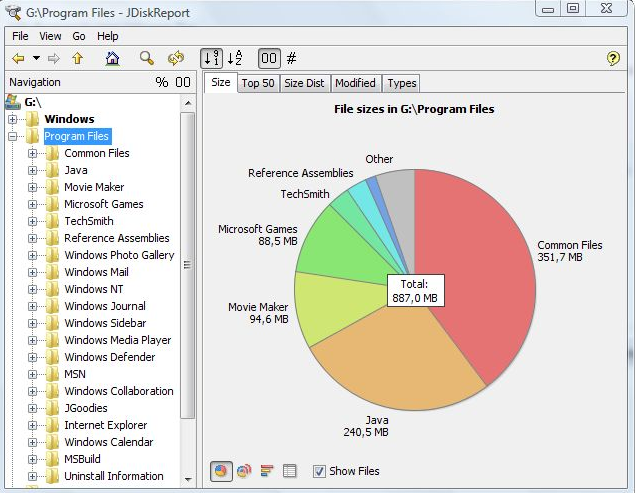
JDiskReport is a useful application that allows users to comprehend the amount of disk space consumed by files and directories while also aiding in the identification of outdated files and folders. The software analyzes your disk drives and compiles various statistics, which can be displayed as summary charts and detailed tables for easier interpretation. It is a completely free, ad-free program that does not have any limitations or expiration dates. This versatile tool is compatible with Windows, Mac, Linux, and other platforms, provided that Java is installed beforehand. Users should ensure that they have Java properly set up prior to installing JDiskReport. The application has been validated across Windows, Mac, and Linux systems, and it is also functional on Solaris and other operating systems that support Java. Additionally, an early version of JDiskReport 2 is currently accessible, which, while less polished than its predecessors from JGoodies, offers a different experience. Although this version is lacking certain features, such as the ability to click on the size pie chart, it can function as a cron job in the background, supplies more detailed information, and showcases a refreshed visual design. As a result, users looking for a robust analysis tool for their disk space management will find JDiskReport to be an invaluable asset.
API Access
Has API
No
API Access
Has API
No
Screenshots View All
No images available
Integrations
Java
No
Pricing Details
$29
Free Trial
Yes
Free Version
No
Pricing Details
Free
Free Trial
No
Free Version
Yes
Deployment
Web-Based
No
On-Premises
No
iPhone App
No
iPad App
No
Android App
No
Windows
Yes
Mac
No
Linux
No
Chromebook
No
Deployment
Web-Based
No
On-Premises
No
iPhone App
No
iPad App
No
Android App
No
Windows
Yes
Mac
Yes
Linux
Yes
Chromebook
No
Customer Support
Business Hours
Yes
Live Rep (24/7)
Yes
Online Support
Yes
Customer Support
Business Hours
Yes
Live Rep (24/7)
No
Online Support
Yes
Types of Training
Training Docs
No
Webinars
No
Live Training (Online)
Yes
In Person
No
Types of Training
Training Docs
Yes
Webinars
No
Live Training (Online)
No
In Person
Yes
Vendor Details
Company Name
4n6Soft
Founded
2017
Country
United States
Website
forensiksoft.com
Vendor Details
Company Name
JGoodies
Country
Germany
Website
www.jgoodies.com/freeware/jdiskreport/
